
We’re all hearing a lot about AI these days – and between stories of doomsday scenarios and billionaire space overlords building data centers on the moon, the technology feels increasingly disconnected from my everyday reality. More futuristic existential threat than a tool which could be used by little ‘ol me. Add in a healthy aversion to the ecological implications, “scraping” of copy-written art and writing from the internet, and the upheaval of many folks’ jobs, and it’s easy to write off using AI altogether. However, the cat is out of the bag, so to speak, and AI is here to stay. Avoiding using AI may soon be in a similar category with avoiding using the internet – you could do it, but you’d be disconnected from the tools most of the world is using to get their work done. I decided it was time to see if I could make some lemonade out of AI lemons. This is the first of two posts with some ways to use AI that I’ve found helpful to my work as an artist – I’m sure there are many more applications though, and I’d love to hear what other folks are doing. Please share in the chat!
How Do I Access and Use AI Anyway?
First some super basics – skip ahead if you’re already using AI. There are many AI “models” out there, owned by different companies, and there are many interfaces for accessing those models. Some interfaces that are easy to use for general sorts of projects like those below are Google Gemini, Chat GPT, Claude, and Perplexity. These are all free to use directly from the web though Chat GPT, Perplexity, and Claude have daily limits on what you can do. Google Gemini kicks in automatically when you conduct a Google search, giving you the “AI summary” – but you can also access it directly. At this time, Chat GPT, Claude, and Perplexity require you to make accounts with your email address before you can use them fully, but you can ask “quick questions” without an account. Each interface is advertised towards specific uses but they all performed similarly for the tasks I tried. There are also AI “assistants” built into software – but we’re going to stick to free and easy-to-get-to web interfaces for this article.
To use AI for a task, just pull up the website for one of the interfaces and explain what you want it to do by typing it in. Be as specific as possible and try to include as many relevant details as you can think of in the first request (most interfaces make you pay to make over a certain number of requests.) The better your question, the better your answer. You can upload documents, spreadsheets, and images for the AI to work with; and you can request that the AI produce downloadable documents, images, spreadsheets and pdfs of things you want to print.
A Cautionary Note About Uploading Files
Whatever you type in and anything you upload to an AI interface can then be used by the AI company to “train” their AI models. That means if you upload a document with client’s email addresses, or a hi-res photo of your art, that’s now getting used by the AI. Someone wouldn’t be able to come along and pull up that exact information or image by asking the AI for it, but it has passed (to some degree) out of your control and it’s hard to know how AI companies may use this data in the future. On the other hand, if the image or information was already publicly available online (such as if the image of your art was on your website) it is already fair game to be used by AI – though the legal grounds for that use are more shaky. There are some privacy controls you can change to stop the interface from saving the data you input – I’d ask the AI how to adjust them if you’re concerned. I decided a long time ago that people steeling images of my art off my website was probably the least of my worries, and I think I feel similarly about AI doing what it’s doing – but there are future unknowns.
OK, now for what you can do with it…
Making Reference Images
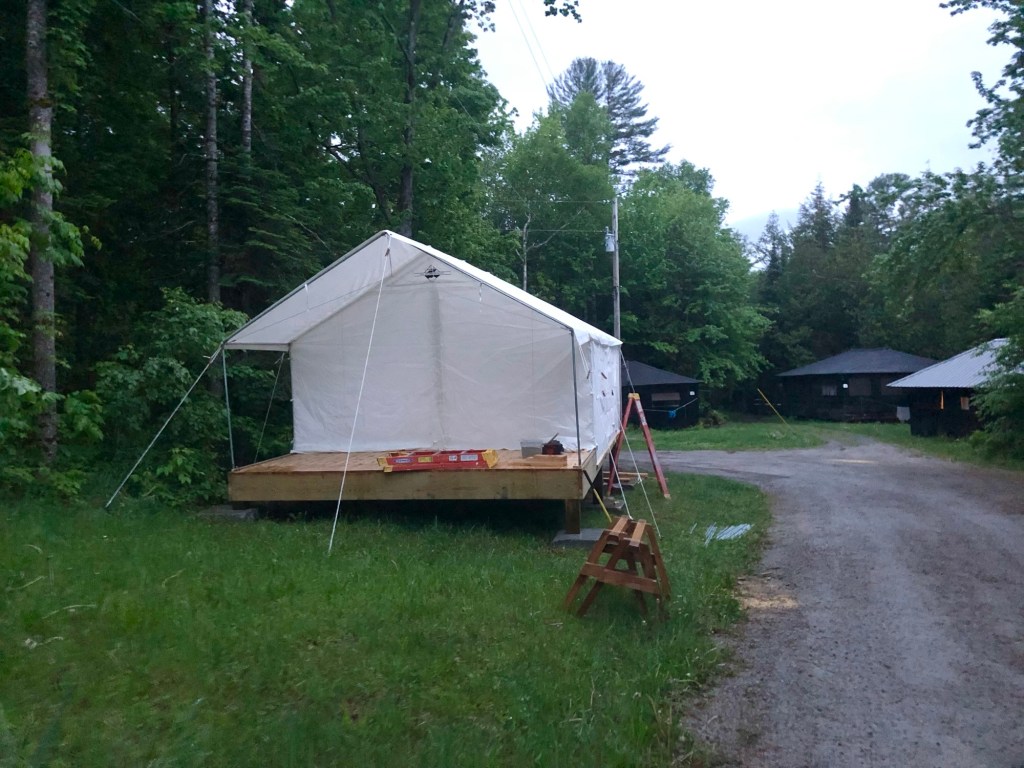
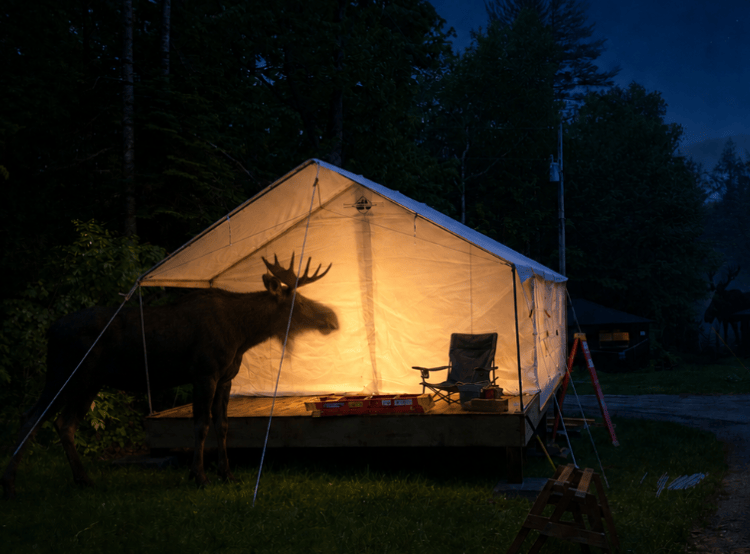
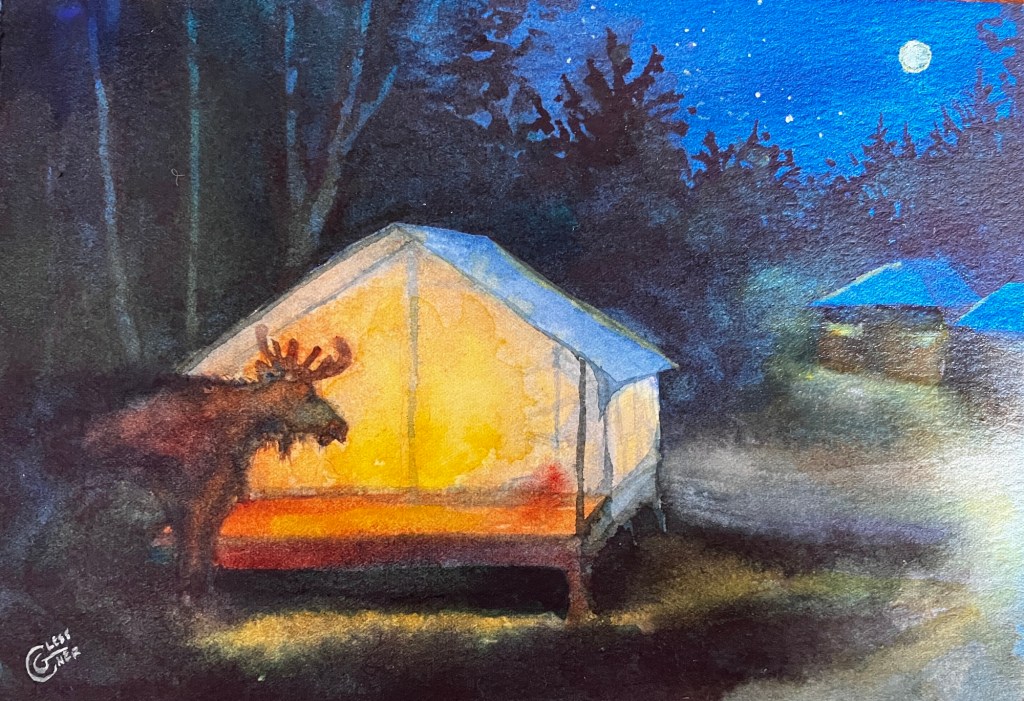
I’ll give you a real-life case study for this. I have a friend from California. I’ve worked with her the past two summers here in Vermont, and she’s become increasingly committed to seeing a moose while she’s here. I think she has some idea that we Vermonters are holding out on the secret moose-viewing locations, as she’s taking it a bit personally that she has yet to see one. For her birthday, I got the idea to make her a small painting of a moose looking right in her tent while she was sleeping. I got this idea the morning before her birthday party. So I turned to AI to help me get a reference image together quickly. I had a photo of her tent in broad daylight surrounded by ladders, and reference photos of moose. I asked Chat GPT to change the lighting in my photo to make it nighttime, remove the ladders (which were making it hard for me to envision the composition) and place the moose looking into the tent. The reference was ready in seconds. It wasn’t the sort of reference I would copy exactly (that’s usually always a bad idea, artistically – and in this case the moose’s legs were tangled with the tent poles in a way that was quite laughable) but using two different versions of the reference photo, I had all the information I needed to get my friend’s painting made in time for the party. Without AI, I would have needed an hour or so on Photoshop or Procreate to accomplish the same task. Probably, since I don’t love working in Photoshop, I would have looked up more reference photos online of tents in the dark to get the lighting right, and then made a pencil sketch and a color sketch to visualize the moose. Then it would have been time for the birthday party and my friend wouldn’t have gotten a present.
If I had been making a larger or more elaborate work and wanted more reference materials, I could have asked AI to create:
- a five-value reference of my image
- a two value notan to check the composition
- a contour line drawing to help with a pencil under-drawing
- to add a grid across the image.
AI also makes it easy to create a bunch of versions of a reference photo and compare them side by side. If you have several reference photos of the same subject, you can ask AI to combine the best elements of all of them, or to make slight tweaks to the location of objects so you can compare them with the original. You can also ask the AI to generate several different compositions from the same photo all on its own.
I tested this using a poorly-composed landscape photo as the starting point. The AI generated three new compositions for me, adding to and moving around parts of the scene. None of the results were things I would paint as-is (elements were oddly out-of-scale and sometimes weirdly placed, like a dock that wasn’t in the water anymore) but they provided me with new ideas of how to develop the photo into a compelling painting that I wouldn’t have come up with on my own. With more requests I could have adjusted the photo further to make something I was ready to draw from.
These uses of AI are far from replacing my existing workflows, but I think I will be using AI to adjust or combine reference photos in the future. Next week we’ll look at several more ways artists can easily use AI to save time and complete tedious tasks.


Wonderful and useful info- as usual, Carrie. I’m sure you are correct that if we don’t start using Ai it will bit us in the —-, it’s the next thing. That said, us artists need to be careful that our work doesn’t become fodder, as AI gets all its information from us, without any compensation. I listened to renowned writer Arrundati on Democracy Now! last night talking about copyright infringement. There has to be a way to protect our creations from being copied or used in a multitude of ways. That would get our attention! Thank you for continuing the conversation- Anni Stafford
LikeLike
I think, unfortunately, our work already IS AI fodder. Whether there are ever any legal implications for that use remains to be seen, but my guess is it will probably be too little, too late. Artists’ reaction to AI scraping is very personal, which makes sense. It’s going to impact you differently based on the type of art you create and how you sell it. For me, I’m not selling low-res online images of my art, I’m selling physical framed paintings, made with my personal style, brush strokes, etc., which AI can’t reproduce. I’m also someone who has trouble staying outraged for very long, which is all contributing to my “if you can’t beat ‘em, join ‘em” philosophy on this topic. I’ll look up that Democracy Now episode- sounds very interesting!
LikeLike